

Reconstitution Schedule vs. Rebalance Schedule
The Reconstitution Schedule defines when the strategy reviews the eligible universe and selects securities. At each reconstitution date, BIASafe reapplies the universe rules, refreshes the eligible securities, and starts a new security selection cycle.The Rebalance Schedule defines when the strategy updates portfolio weights between reconstitution dates. A rebalance can refresh target weights for the existing selection, or be triggered by calendar-based rules or portfolio drift rules.For example, a strategy may reconstitute quarterly to select securities, while rebalancing monthly to keep portfolio weights closer to target. In this case, securities can enter or leave the model only on reconstitution dates, while weights can be adjusted more frequently through rebalancing.
Note: A reconstitution always includes a rebalance, because the model updates both its security selection and its target weights. A rebalance, however, does not always include a reconstitution. It may simply refresh portfolio weights between two reconstitution dates while keeping the selected securities unchanged.
Event Timeline Preview
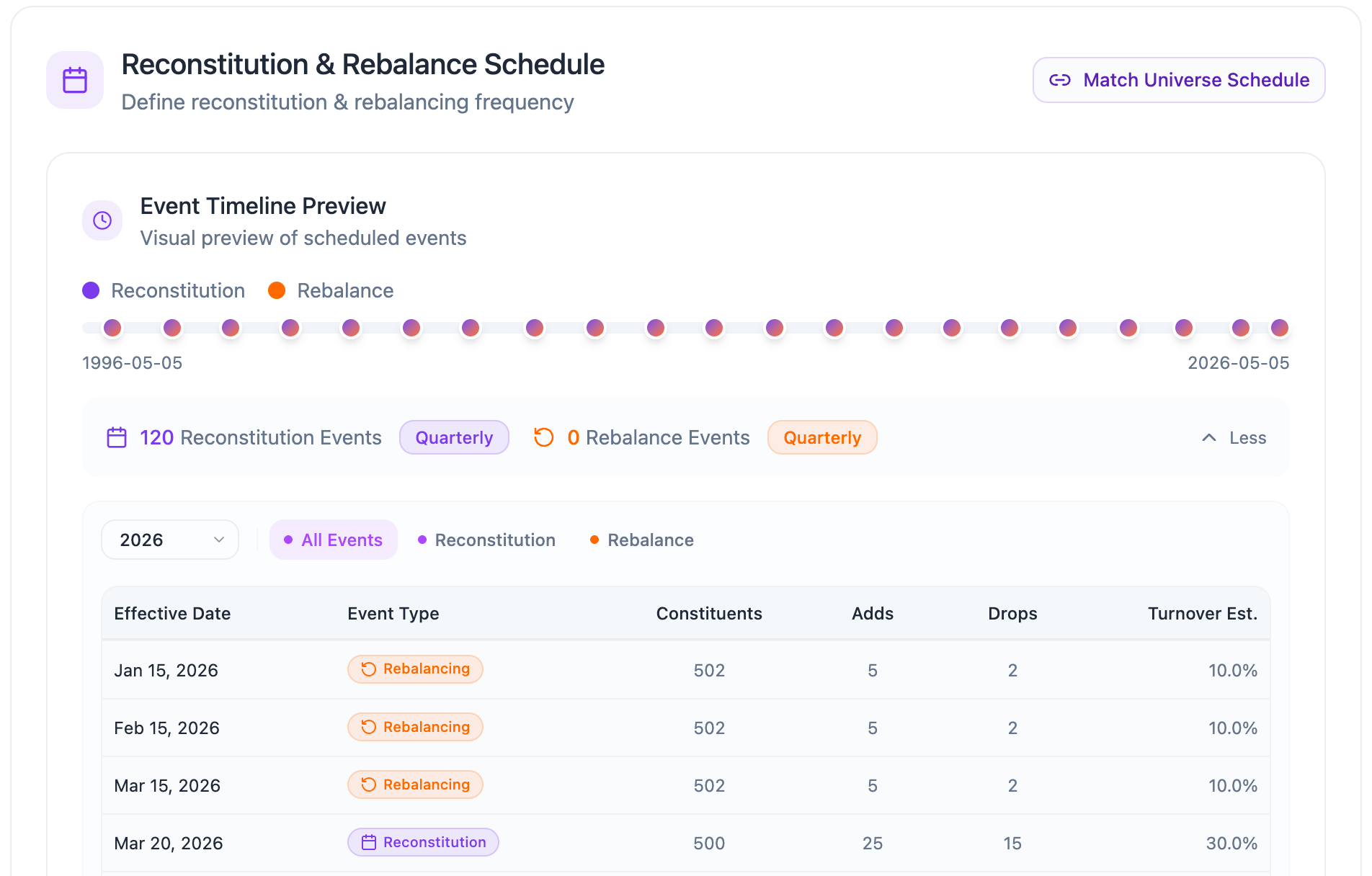
- Reconstitution events : Dates when the model refreshes the eligible universe and selects securities.
- Rebalance events : Dates when the model updates portfolio weights between reconstitution dates.
Match Starting Universe Schedule
Match Starting Universe Schedule
The Match Universe Schedule button allows users to quickly align the model’s reconstitution and rebalance schedule with the selected starting universe.When rebalance step is opened for the first time, the schedule is automatically matched to the selected starting universe. This means the model initially follows the same reconstitution and rebalance cadence as the source index or universe methodology.

Starting Universe Schedule Presets
These presets reflect the provider-aligned schedule used when the model is matched to the selected starting universe.Reconstitution Schedule
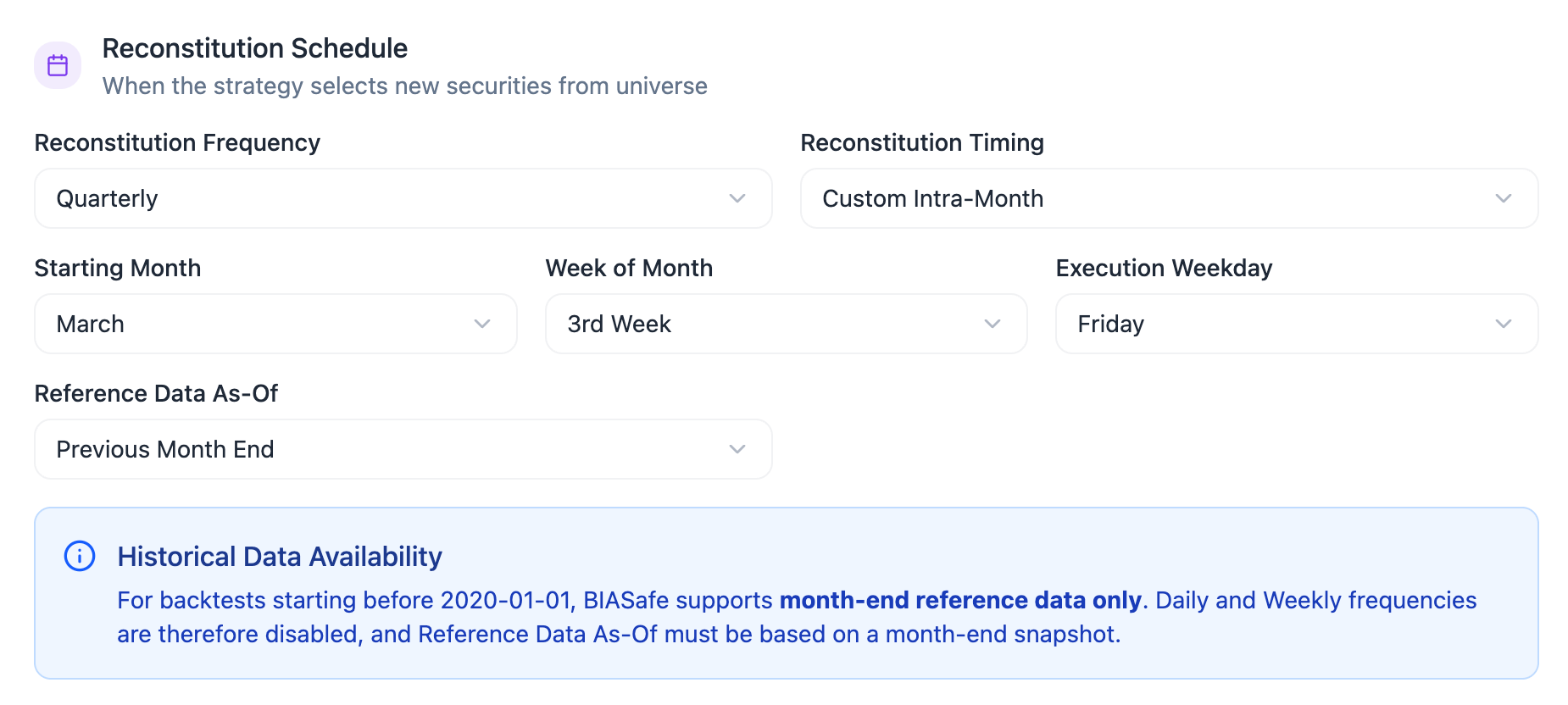
Reconstitution Frequency
The Reconstitution Frequency determines how often the model performs a full universe review. Available options include Daily, Weekly, Monthly, Quarterly, Semi-Annually, and Annually.Note on Daily and Weekly ReconstitutionDaily and weekly reconstitution are not available for backtests starting before 2020-01-01, because historical reference data is limited to month-end snapshots before that date.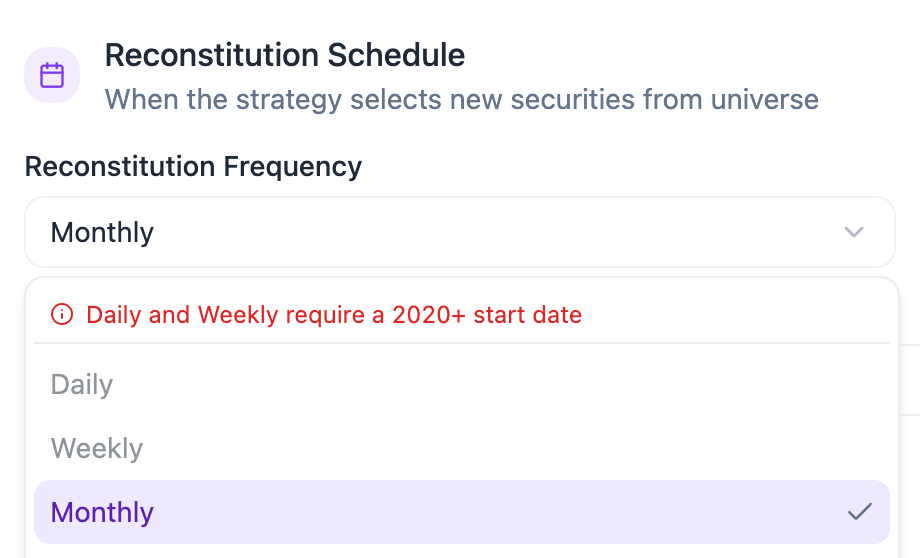
Daily or weekly reconstitution already refreshes the universe and updates portfolio weights at a high frequency. Inter-reconstitution rebalancing is therefore disabled for this schedule.To enable a separate rebalance schedule, select a monthly, quarterly, semi-annual, or annual reconstitution frequency.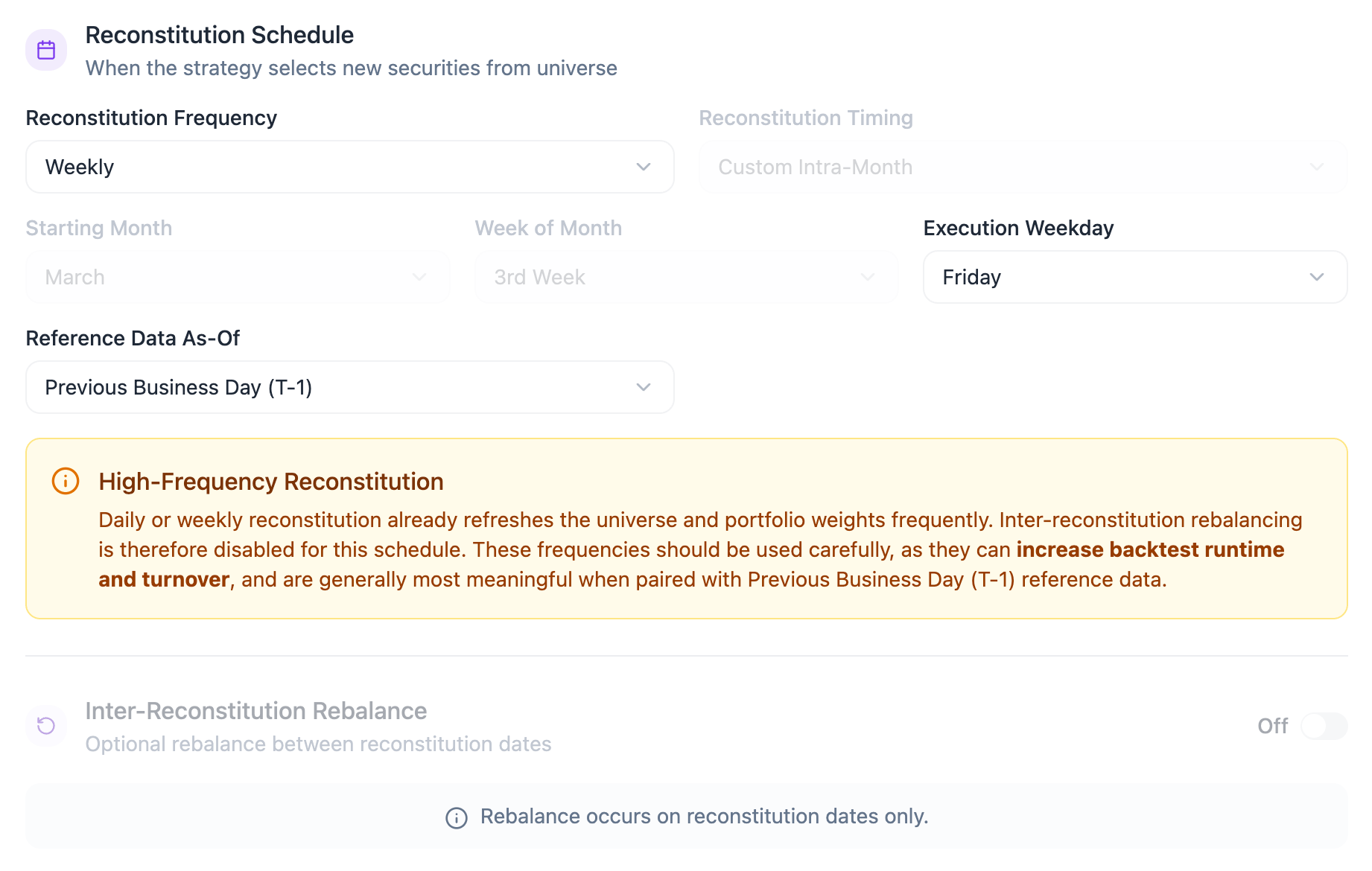
Reconstitution Timing
The Reconstitution Timing determines when the reconstitution event occurs within the selected frequency.This section is only required for Monthly, Quarterly, Semi-Annual, and Annual reconstitution schedules.For Daily reconstitution, no timing selection is required because the model reconstitutes every business day. For Weekly reconstitution, users only select the execution weekday.
- Month Start
Runs the reconstitution at the first business day of the scheduled month. - Month End
Runs the reconstitution at the last business day of the scheduled month. - Custom Intra-Month
Allows users to select the starting month, week of month, and execution weekday.
Reference Data As-Of
The Reference Data As-Of setting defines which data snapshot is used to evaluate the universe at each reconstitution event. Available options include Previous Business Day (T-1), Custom Business Day Lag, Previous Month End, Month End, 2 Months Prior, Month End, 3 Months Prior, Previous Quarter End, and Previous Year End.For backtests starting before 2020-01-01, BIASafe currently supports month-end reference data only. This applies to both reconstitution and rebalance schedules.As a result, some reference data options may be unavailable for these historical backtests, including Previous Business Day (T-1) and Custom Business Day Lag.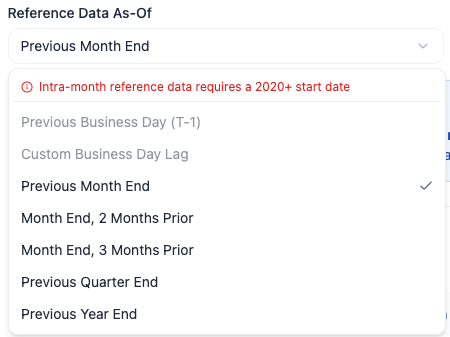
Rebalance Schedule


Rebalance Method
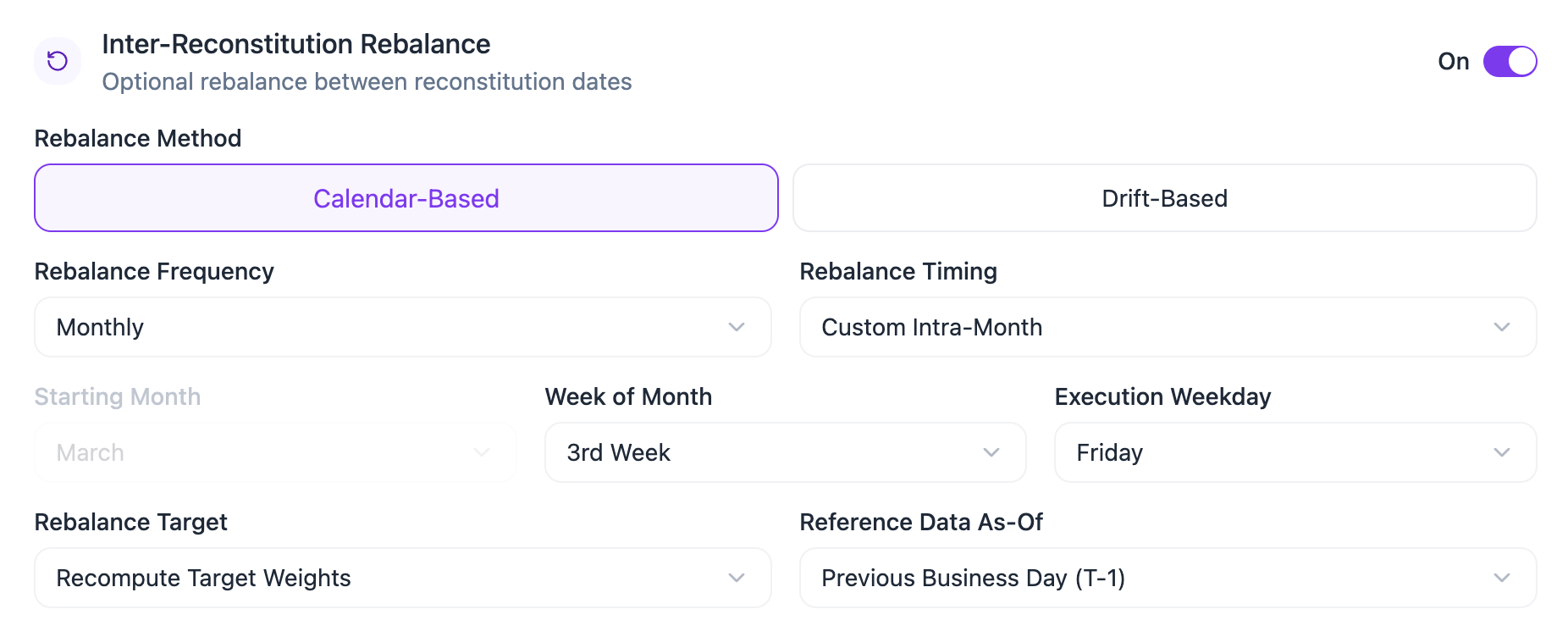
When inter-reconstitution rebalancing is enabled, users can choose between two methods.Calendar-Based Rebalance
- Rebalance Frequency
The Rebalance Frequency determines how often the model updates portfolio weights between reconstitution dates.
The rebalance frequency must be more frequent than the reconstitution frequency.For example, a strategy that reconstitutes quarterly may rebalance monthly, weekly, or daily, but it cannot rebalance quarterly, semi-annually or annually.BIASafe automatically enforces this rule by only allowing valid rebalance frequencies based on the selected reconstitution schedule.
- Rebalance Timing
The Rebalance Timing uses the same logic as Reconstitution Timing. Users can select Month Start, Month End, or Custom Intra-Month to define when the rebalance occurs within the selected frequency.
Drift-Based Rebalance
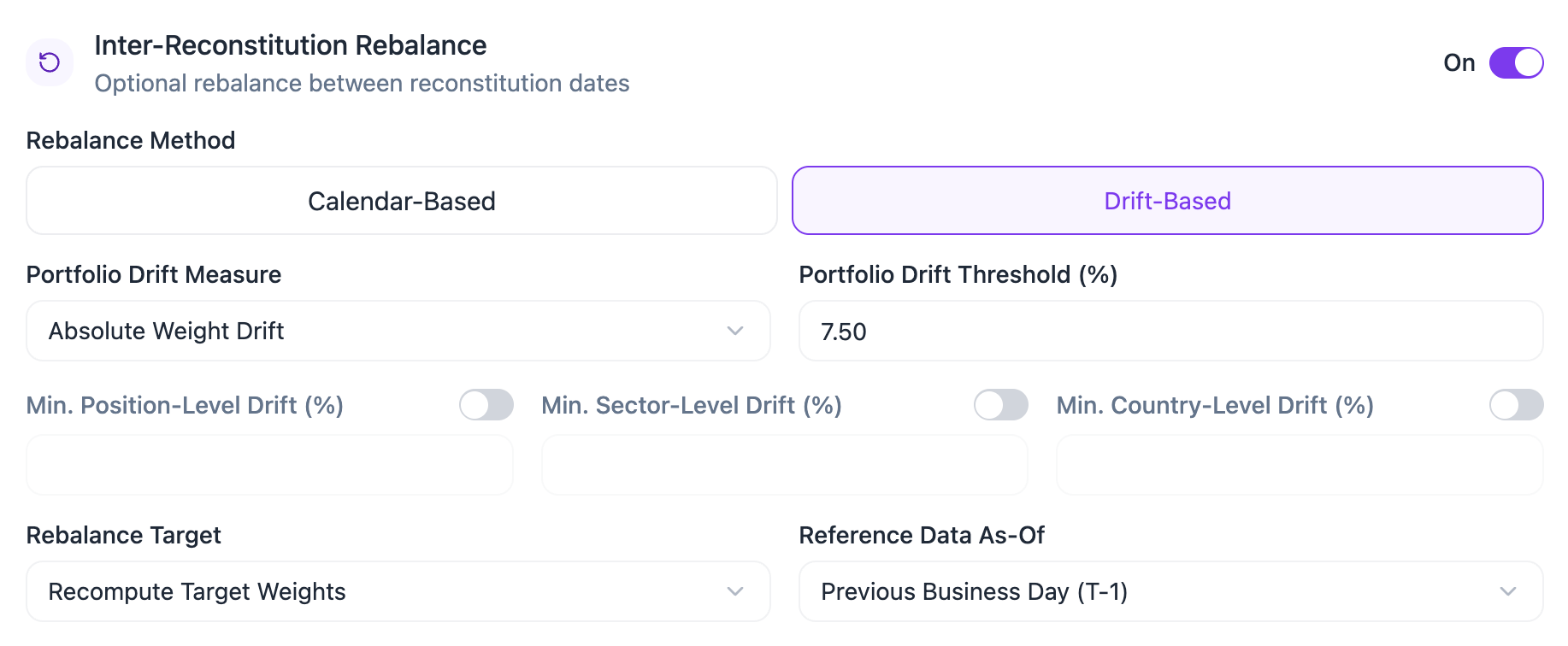
Rebalance Target
The Rebalance Target defines how BIASafe handles target weights when a rebalance occurs.- Keep Existing Target Weights preserves the target weights that were already set at the last reconstitution. The rebalance only brings the portfolio back toward those weights.
- Recompute Target Weights calculates a new set of target weights for the rebalance date using the selected weighting method and reference data.
Reference Data As-Of
Schedule Impact Summary
The schedule defines how the strategy evolves over time. It determines when securities are allowed to enter or leave the model, when portfolio weights are refreshed, which reference data snapshot is used, and how much turnover the strategy may generate.- A more frequent schedule can make the strategy more responsive to changes in the universe, signals, or portfolio weights, but it may also increase trading activity, turnover, and backtest runtime.
- A less frequent schedule can reduce turnover and create a more stable portfolio, but it may allow the model to drift further from its target allocation between events.
Backtest Schedule Mechanics
This section explains how BIASafe handles schedule dates during historical backtests. It is intended for users who want to understand the mechanics behind event dates, reference dates, and Morningstar snapshot selection. The schedule shown in the user interface represents the strategy’s intended reconstitution and rebalance calendar. During a backtest, BIASafe converts that schedule into two distinct types of dates:- Event dates, which define when the model acts.
- Lagged reference dates, which define which data snapshot is used to make the decision.
Event Date Generation
The scheduler first generates reconstitution and rebalance event dates from the selected schedule settings. Event dates are aligned to the appropriate universe calendar. For example, U.S. universes may use a U.S. trading calendar, while Canadian universes may use a Canadian trading calendar. BIASafe applies deterministic event-date rules:| Timing Option | Backtest Event-Date Rule |
|---|---|
| Month Start | Moves to the next valid session on or after the first calendar day of the month |
| Month End | Moves to the previous valid session on or before the last calendar day of the month |
| Custom Intra-Month | Selects the configured weekday, then moves to the previous valid session if needed |
| Daily | Uses each valid session in the selected calendar |
| Weekly | Uses the selected weekday, adjusted to a valid session |
Reconstitution & Rebalance Dates
A reconstitution always appears in the rebalance schedule. This is because a reconstitution updates both the eligible universe and the target weights. When inter-reconstitution rebalancing is disabled, the full rebalance schedule is simply equal to the reconstitution schedule. When inter-reconstitution rebalancing is enabled, BIASafe generates additional rebalance dates between reconstitution dates. These dates must occur within the active reconstitution interval.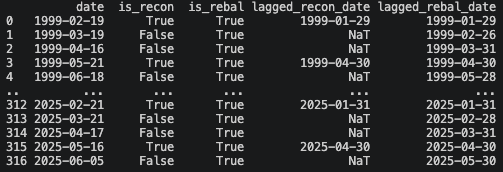
Lagged Reference Date Calculation
After event dates are generated, BIASafe calculates the relevant lagged reference dates. The selected Reference Data As-Of rule determines how the lagged date is computed.| Reference Data As-Of | Backtest Logic |
|---|---|
| Previous Business Day | Uses the previous valid session before the event date |
| Custom Business Day Lag | Uses the Nth previous valid session before the event date |
| Previous Month End | Uses the previous month-end, adjusted to the previous valid session |
| Month End, 2 Months Prior | Uses the month-end two months prior, adjusted to the previous valid session |
| Month End, 3 Months Prior | Uses the month-end three months prior, adjusted to the previous valid session |
| Previous Quarter End | Uses the previous quarter-end, adjusted to the previous valid session |
| Previous Year End | Uses the previous year-end, adjusted to the previous valid session |
Universe Snapshot Resolution
The lagged dates generated by the scheduler are theoretical reference dates. Before fetching the stating universe constituent data, BIASafe resolves those lagged dates against the actual index snapshots available in the database. This is necessary because the generated lagged date and the Starting Universeeffective_date may not always be identical.

Only lagged reference dates are resolved against Morningstar snapshots. Actual reconstitution and rebalance event dates remain unchanged.
| Output Column | Meaning |
|---|---|
date | Actual reconstitution or rebalance event date |
is_recon | Whether the row is a reconstitution event |
is_rebal | Whether the row is a rebalance event |
lagged_recon_date | Morningstar-resolved snapshot date used for reconstitution |
lagged_rebal_date | Morningstar-resolved snapshot date used for recomputed rebalancing |
Snapshot Matching Policy
Snapshot Matching Policy
BIASafe applies different snapshot matching rules before and after 2020.Before 2020, historical Morningstar data may be available mostly as month-end snapshots. BIASafe therefore allows a wider tolerance around generated lagged dates.From 2020 onward, daily or near-daily snapshots are expected, so BIASafe applies stricter matching rules.
The matching process follows this sequence:
| Period | Tolerance | Rationale |
|---|---|---|
| Before 2020-01-01 | Up to 3 calendar days | Historical snapshots may be sparse or month-end only |
| From 2020-01-01 onward | Up to 1 calendar day | Daily snapshots are expected |
- BIASafe first checks whether the generated lagged date exists exactly in the Morningstar database.
- If no exact match exists, BIASafe searches for an acceptable nearby Morningstar
effective_date. - If no acceptable snapshot exists, the date is rejected and the backtest does not proceed.
Snapshot Resolution Report
Snapshot Resolution Report
Before fetching constituent data, BIASafe checks all required lagged reference dates against the available universe snapshots.The system does not stop at the first missing date. Instead, it generates a full resolution report showing: total dates checked, dates mapped exactly, dates resolved to nearby snapshots, and rejected dates. Example report:
Data Fetching After Resolution
After snapshot resolution is complete, BIASafe fetches constituent data using the resolved starting universe snapshot dates. This means the constituent query uses the resolvedlagged_recon_date and lagged_rebal_date values, not the event dates.
This ensures that the backtest retrieves the exact snapshots used to evaluate the universe, select securities, and recompute weights.
Why This Matters
This process is designed to make historical backtests more realistic and auditable. It ensures that:- event dates follow a realistic implementation calendar
- reference data uses prior snapshots
- Starting universe data is only fetched from available database snapshots
- missing or unavailable snapshots are reported clearly
- the final schedule distinguishes execution dates from data snapshot dates